Gridsnap vs Planner 5D: Planning and Decorating Your Home
Planner 5D and Gridsnap both cover planning a home, furnishing it and choosing materials. Planner 5D is a consumer design app across web, desktop and mobile, with a large catalog, renders, 360° walkthroughs and AI tools on paid plans; its PDF report (with plan, renders and elevations) is available on every plan, and DWG/DXF is PRO only. Gridsnap works to exact dimensions and gives you layout, furniture, finishes and the measured outputs free: a scaled vector PDF (technical or textured), DWG/DXF, schedules and an overhead image.
Choose each when
Choose Gridsnap when
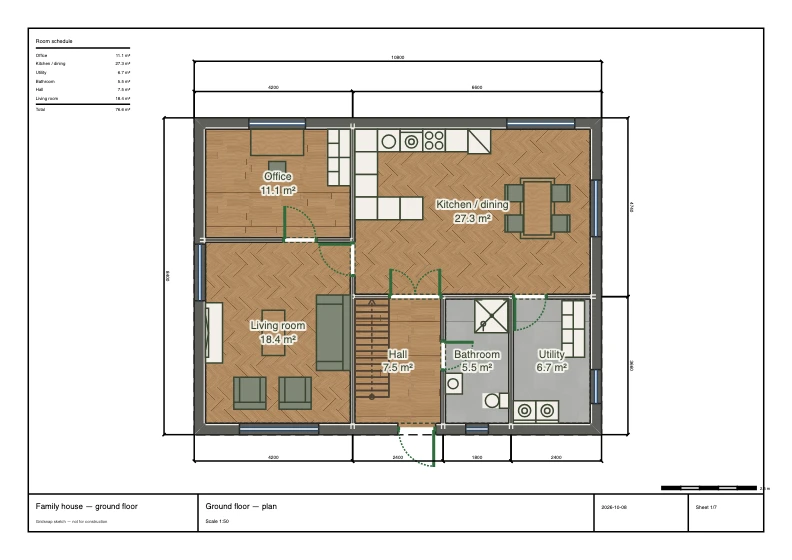
Choose Gridsnap when measurements decide the plan: walls typed to the millimetre, furniture resized to the actual products, finishes on single wall faces and furniture parts, and a scaled PDF, textured plan with finish legend, finish schedule and DWG on the free tier. It is a good fit for a renovation you will discuss with a builder, or for checking that a layout really fits before you buy.
Choose Planner 5D when
Choose Planner 5D when you want to explore the look of your home with a large catalog, on a phone or tablet as well as a computer, and finish with rendered images or a 360° walkthrough. Its rendering and catalog go further than Gridsnap’s, and its free plan allows unlimited projects. If you only need a quick, attractive idea of a room, it is the easier start.
Gridsnap vs Planner 5D
| Gridsnap | Planner 5D | |
|---|---|---|
| Price | Free; Gridsnap Pro as 90-day Pro access ($39 once), Pro Monthly ($19/month) or Pro Annual ($149/year), with the same features on all three | Free; Premium $19.99/month or $59.99/year; Professional $49.99/month or $399.99/year |
| Free tier | Draw, furnish, finish and export free, with no account needed to draw; unlimited local projects; one synced cloud project with an account | Unlimited projects; 50% of the furniture catalog; PDF report export |
| Platform | Web browser; nothing to install | Web, iOS, Android, Windows and macOS |
| Furniture | Furniture catalog with editable width, depth and height, wall snapping, placed in plan or 3D (free). Furnish a room automatically on Pro | Full 10K+ catalog on Premium; upload your own 3D models on Professional |
| Finishes and materials | Finishes on room floors, single wall faces, furniture parts, doors, windows and stairs, from built-in materials and the Gridsnap texture library; no upload of your own textures (free). Room kits and saved finish schemes on Pro | Materials and textures on each side of a wall, with tint, scale and rotation |
| 2D plan output | Technical or Textured plan, free: the PDF keeps lines and text vector with image texture fills; PNG is a raster image. Optional finish legend | PDF report with 2D floor plan, blueprint, renders and elevation pages on all plans (web) |
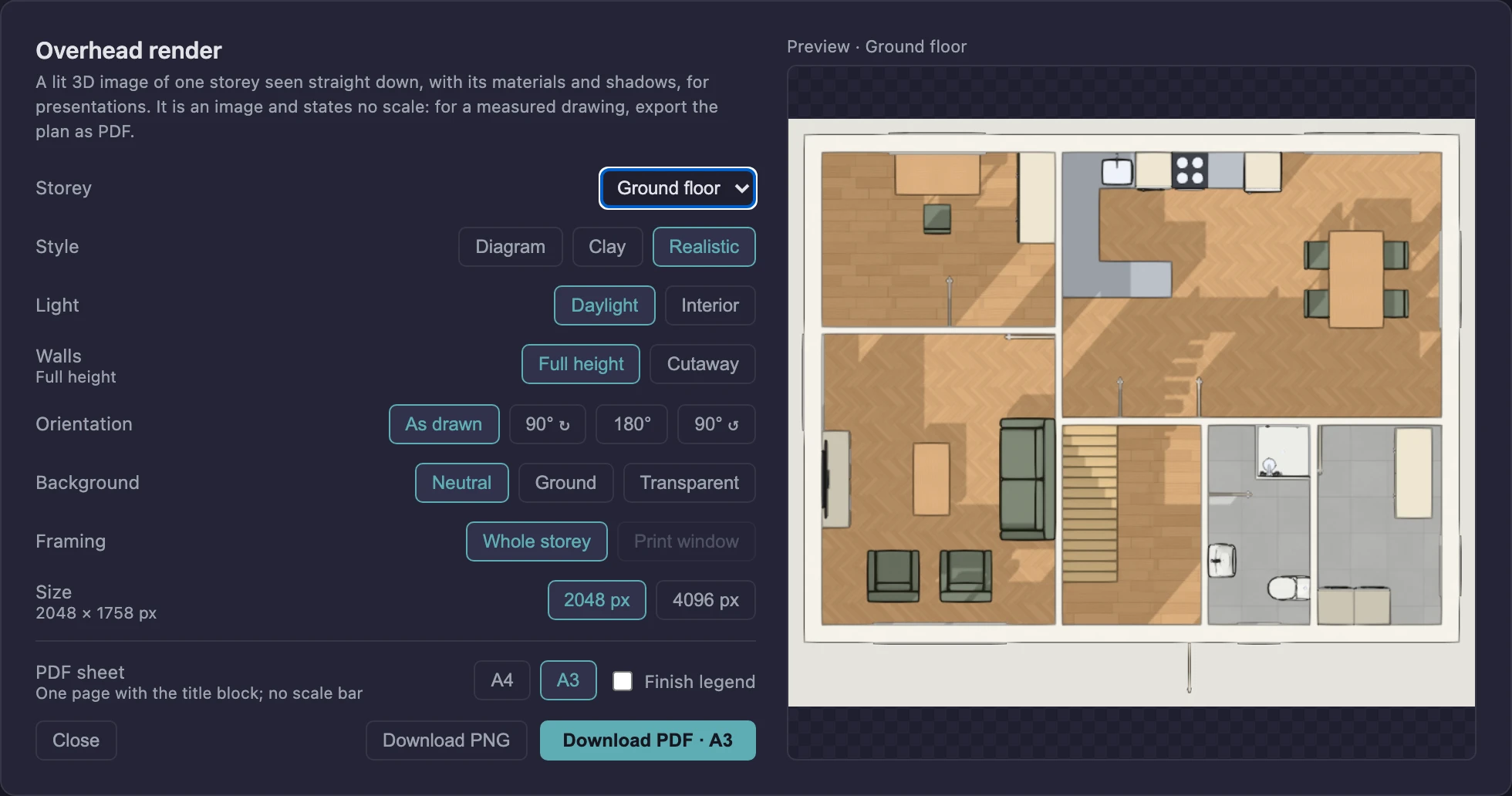
| Renders and 3D | Live 3D (Diagram, Clay, Realistic), saved views and walkthrough; overhead render of a storey as PNG or one-page PDF, a presentation image without scale (free). AI presentation images from a 3D view or from above on Pro: AI-generated, so details may differ from the design. No 360 views, video or 3D-model export | Standard renders on Premium; unlimited 4K renders, 360° walkthrough and panorama on Professional |
| CAD (DWG/DXF) | AutoCAD 2018 DWG or DXF of the sheet set (model space, sheet layouts, native dimensions), plus legacy R12 DXF; free. Gridsnap does not open DWG/DXF | 2D DWG/DXF export on Professional only |
| AI | Pro: generate checked layouts from a room list, AI suggestions for the plan and automatic room furnishing, within usage limits | AI floor plan recognition, 3D models from photos and AI Studio credits on paid plans |
Planner 5D details checked on 2026-10-14 against its own pricing and documentation (listed under Sources). Rows we could not confirm are left out rather than marked “no”. Gridsnap prices are the current list prices; corrections welcome via the editor's feedback form.
How this job works in Gridsnap
- Layout: draw the walls to typed lengths and place doors and windows.
- Furnish: place items, set their width, depth and height, and check them in plan and 3D.
- Finishes: choose floors, wall faces and furniture parts from built-in materials and the texture library.
- Deliver: export a Technical or Textured PDF at scale, a finish schedule, DWG/DXF, or an overhead render, free.
Where Planner 5D is strong
- A large furniture catalog (10K+ items on paid plans) and an unlimited number of free projects
- Renders, including unlimited 4K renders and 360° walkthroughs on Professional
- AI floor plan recognition and 3D models from photos
- Apps on web, mobile and desktop, plus a PDF report on every plan
What to check before you choose Planner 5D
- Half the catalog on the free plan; renders and AI on paid plans
- DWG/DXF export is Professional only, and exports 2D
Common questions
Weighing more options? See the free floor plan creators roundup, the full feature list, or browse ready-made templates to judge the output directly.
Is Gridsnap or Planner 5D better for a renovation plan?
For a plan a builder will measure from, Gridsnap: exact walls, anchored dimensions and a scaled vector PDF and DWG, free. Planner 5D is stronger for rendered images of how the finished room could look.
Which has the better free tier?
They are free in different ways. Planner 5D allows unlimited projects and its PDF report on every plan, with half the catalog. Gridsnap includes drawing, furnishing, finishes and PDF/PNG/DWG/DXF exports free, and syncs one cloud project with an account.
Can I choose materials and finishes in both?
Yes. Planner 5D lets you apply materials and textures to each side of a wall and adjust tint, scale and rotation. Gridsnap applies finishes to room floors, single wall faces, furniture parts, doors, windows and stairs, and can print them on a Textured plan with a finish legend.
Can Planner 5D or Gridsnap export to CAD?
Gridsnap exports an AutoCAD 2018 DWG or DXF free. Planner 5D’s help says DWG/DXF export is for PRO users and exports the project in 2D.
Sources and dates
Planner 5D facts were checked on 2026-10-14 against these official pages. Prices and plans change; check the vendor's page before you buy. Gridsnap details on this page were updated on 2026-10-15.
- Planner 5D pricing
- Support: export to PDF
- Support: export in DWG or DXF
- Support: change a wall material
Gridsnap facts come from the current release and its help articles; prices from the pricing page.
Try it on your own plan
Gridsnap runs in the browser and drawing needs no account. Draw a room to real dimensions, furnish it and try a finish, then export the PDF.