Test the layout before you spend real money.
You're moving walls, opening the kitchen, adding a room — and somewhere between the idea and the builder's quote, the layout has to be decided. Gridsnap turns it into a millimetre-exact plan you can test: trace the home you have, draw the change, furnish it and try the finishes, let the plan check find the problems while they're still free to fix, and hand over a drawing a professional can measure and price.
From "what if" to a drawing you can price
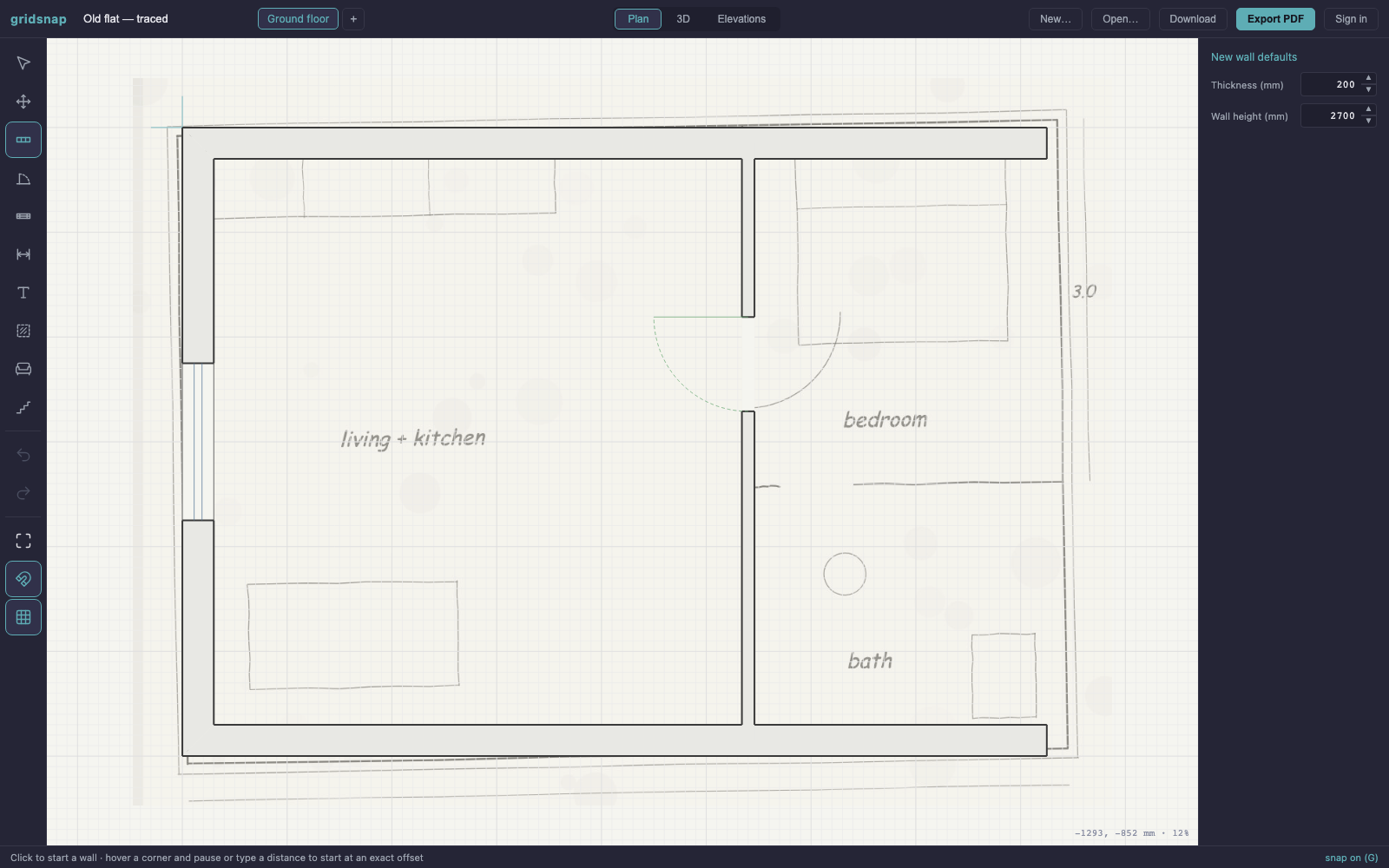
Import a scan, photo or PDF screenshot of the current plan, calibrate it against one measurement you know, and trace over it — or draw from your own tape-measure numbers. Either way you end up with the as-built in real millimetres, not a sketch.
Move the wall. Open the kitchen. Add the extension. Walls, doors and windows land at exact dimensions, rooms report their real net m² as you go, and the 3D view and elevations rebuild themselves with every edit — so you see the space, not just the lines.
Put your real furniture in at its real size and measure what fits around it, then choose floors, wall finishes and an accent wall in the Finishes activity and see them in a textured plan and in 3D. Choosing finishes one surface at a time is free; comparing two finish schemes side by side is Pro.
A rule engine reads the geometry and flags what costs money later: doors that can't swing, rooms you walk through furniture to reach, a bedroom short on daylight, a kitchen triangle that doesn't work. The expert layer explains each finding like an architect's note and can apply the unambiguous fixes — that part is Pro.
Export a true-scale PDF your builder can measure with a ruler, Technical or Textured with your finishes and a finish schedule, a layered DWG or DXF that opens in your architect's CAD, or a share link they view in the browser — no account, no app. A dimensioned plan gets you a real quote; a napkin photo gets you an estimate.
The expensive mistakes are layout mistakes
A renovation rarely goes over budget because a wall cost more than quoted. It goes over because the layout was wrong and nobody noticed until it was built: the door that can't open past the new island, the bathroom you reach through the bedroom, the corridor that swallowed the extension's floor area. On site, each of those is a change order. On a drawing, each is a five-minute edit.
That is the whole point of planning in millimetres instead of on a napkin. Exact walls make the plan check possible — rules about door swings, clearances and daylight only mean something against real dimensions — and real dimensions are what your builder prices from. The drawing that finds your mistakes and the drawing that gets you an honest quote are the same drawing.
Keep the as-built. Argue about the copies.
Trace the home as it stands, then draw what-ifs against it: knock through or keep the wall, island or galley, extension to the side or the back. Duplicating the plan and editing the copy is free. On Pro, design options make the comparison a feature — the as-built and every option live as siblings of one project, you flip between them without losing your place in 3D, and a compare view puts them side by side.
When one option wins, it's already a working drawing: dimensioned, checked, exportable. Nothing to redraw.
Not sure how big an extension should be before you draw it? Compare its height, width and depth against the house first.
Renovation planning, answered
Never drawn a plan before? Start with the step-by-step drawing guide, keep the room sizes & clearances cheat sheet open while you sketch, and check the five kitchen layouts before you commit to one. Rather have your existing plan turned into CAD for you? The tracing service starts at €29 per floor.
How do I make a floor plan of my existing home?
Two ways. If you have any drawing of it — an old blueprint, the estate agent's PDF, even a photo of a plan — import it into Gridsnap as an underlay, calibrate the scale against one known distance, and trace the walls. If you have nothing, measure room by room with a tape measure and draw directly: type each wall length and it lands exact. Both routes are free.
Can I try different renovation layouts side by side?
Yes. The simplest way is to duplicate the plan file and edit the copy — free. On Pro, design options make this a first-class workflow: keep the as-built, draw option A and option B as siblings of the same project, switch between them instantly and compare them in one dialog, with version history on each.
Can I try different finishes without redrawing?
Yes. Finishes are separate from the layout: choose a floor, wall finishes or one accent wall in the Finishes activity and nothing in the drawing moves. Choosing one surface at a time is free. With Pro, save the finishes as a named finish scheme, try another set, and compare the two side by side with every difference listed by room. Finishes describe how the rooms look; they are not prices or product specifications, so check samples and suppliers before you order.
Will Gridsnap tell me if my new layout works?
It checks the layout the way an experienced planner would: door swings and clearances, a walking route to every room, kitchen and bathroom practice, room size minimums, daylight. Mechanical impossibilities are flagged free; the full expert review with explanations and one-click fixes is Pro. What it deliberately does not do: it cannot know which of your walls are load-bearing, and it does not check structural safety or your local building regulations — that judgement stays with your builder, engineer or architect.
Do I still need an architect or builder?
For structural changes, permits and construction — yes, and Gridsnap is built to make that conversation better, not to replace it. You arrive with a measurable, to-scale drawing of exactly what you want, they respond with real numbers and real objections. Professionals quote tighter against a dimensioned plan because there is less to guess.
What should I give my builder to get an accurate quote?
A dimensioned plan at a stated scale. From Gridsnap that is a true-vector PDF (1:50 or 1:100 on A4–A2, with a title block and scale bar) they can print and measure, plus a share link they can open in the browser and walk in 3D. If they or your architect work in CAD, export the layered DWG or DXF — it opens clean in AutoCAD and ArchiCAD.
How much does planning a renovation in Gridsnap cost?
Drawing, tracing, 3D, elevations and every export are free — no watermark, no account required. Gridsnap Pro (the additional plan checks, AI suggestions, project Options, automatic dimensions, material quantities and full cloud version history) comes as 90-day Pro access ($39 once, no automatic renewal), Pro Monthly ($19/month) or Pro Annual ($149/year) — the same features on all three, unlimited projects included. A renovation with an end date is what the one-time option is there for.
Your renovation, in millimetres.
Trace the home you have, draw the home you want, and find the mistakes while they still cost nothing. Free to draw and export — no account needed.