Gridsnap vs Sweet Home 3D: Free Home Design in the Browser or on the Desktop
Sweet Home 3D is free, open-source (GPL) interior design software: a desktop app for Windows, macOS and Linux and a free online version, with precise walls, dimension lines, over 10,000 models and 400 textures, imported models and textures, and photo and video rendering. Gridsnap is free at its core too and runs in the browser: you lay out, furnish and finish the rooms, then export a scaled vector PDF (technical or textured), DWG/DXF, schedules and an overhead image. Both can furnish and decorate; they differ in rendering, outputs and where they run.
Choose each when
Choose Gridsnap when
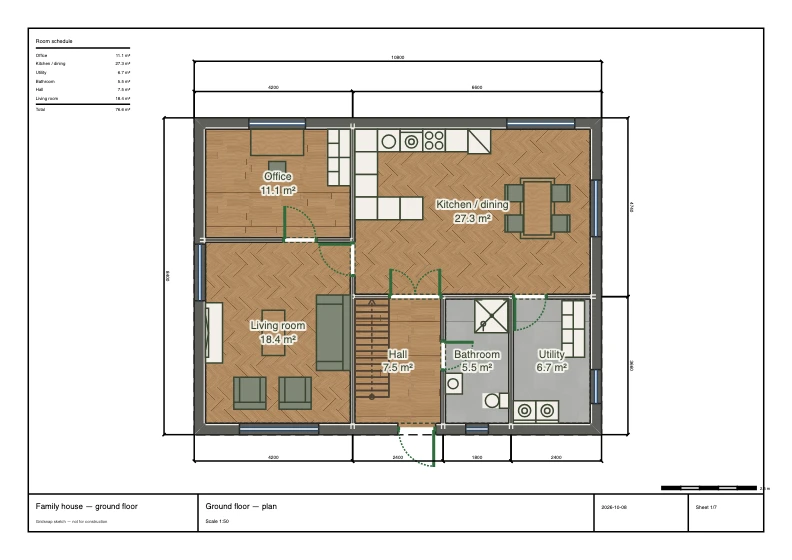
Choose Gridsnap when you want to start in a browser with nothing to install and finish with drawings: exact walls, furniture sized to real products, finishes on single wall faces and furniture parts, a Textured plan with a finish legend, a finish schedule, a scaled vector PDF and a DWG. Plans can be shared by link and synced to one cloud project free.
Choose Sweet Home 3D when
Choose Sweet Home 3D if you want free, open-source software that runs offline on your own computer, if rendered photos and videos of the interior are the goal, or if you want to bring in your own models and textures. Gridsnap makes no video and does not take uploaded textures, and its perspective images are AI-generated on Pro rather than rendered from the model; Sweet Home 3D renders photos and videos from the model itself, at no cost.
Gridsnap vs Sweet Home 3D
| Gridsnap | Sweet Home 3D | |
|---|---|---|
| Price | Free; Gridsnap Pro as 90-day Pro access ($39 once), Pro Monthly ($19/month) or Pro Annual ($149/year), with the same features on all three | Free and open source (GNU GPL); the mobile app is a paid version |
| Free tier | Draw, furnish, finish and export free, with no account needed to draw; unlimited local projects; one synced cloud project with an account | Desktop and online versions free, with no tiers |
| Platform | Web browser; nothing to install | Windows, macOS and Linux desktop (works offline), online in a WebGL browser, paid iOS and Android apps |
| Exact sizing | Typed lengths and snapping in millimetres or feet and inches; dimensions stay attached as you edit | Walls with precise dimensions by mouse or keyboard; dimension lines and room areas |
| Furniture | Furniture catalog with editable width, depth and height, wall snapping, placed in plan or 3D (free). Furnish a room automatically on Pro | Over 10,000 models in the full download; import your own 3D models; resize furniture |
| Finishes and materials | Finishes on room floors, single wall faces, furniture parts, doors, windows and stairs, from built-in materials and the Gridsnap texture library; no upload of your own textures (free). Room kits and saved finish schemes on Pro | Colours and textures on furniture, walls, floors and ceilings; 400 textures included; import your own |
| 2D plan output | Technical or Textured plan, free: the PDF keeps lines and text vector with image texture fills; PNG is a raster image. Optional finish legend | Print and export PDF, bitmap or vector images |
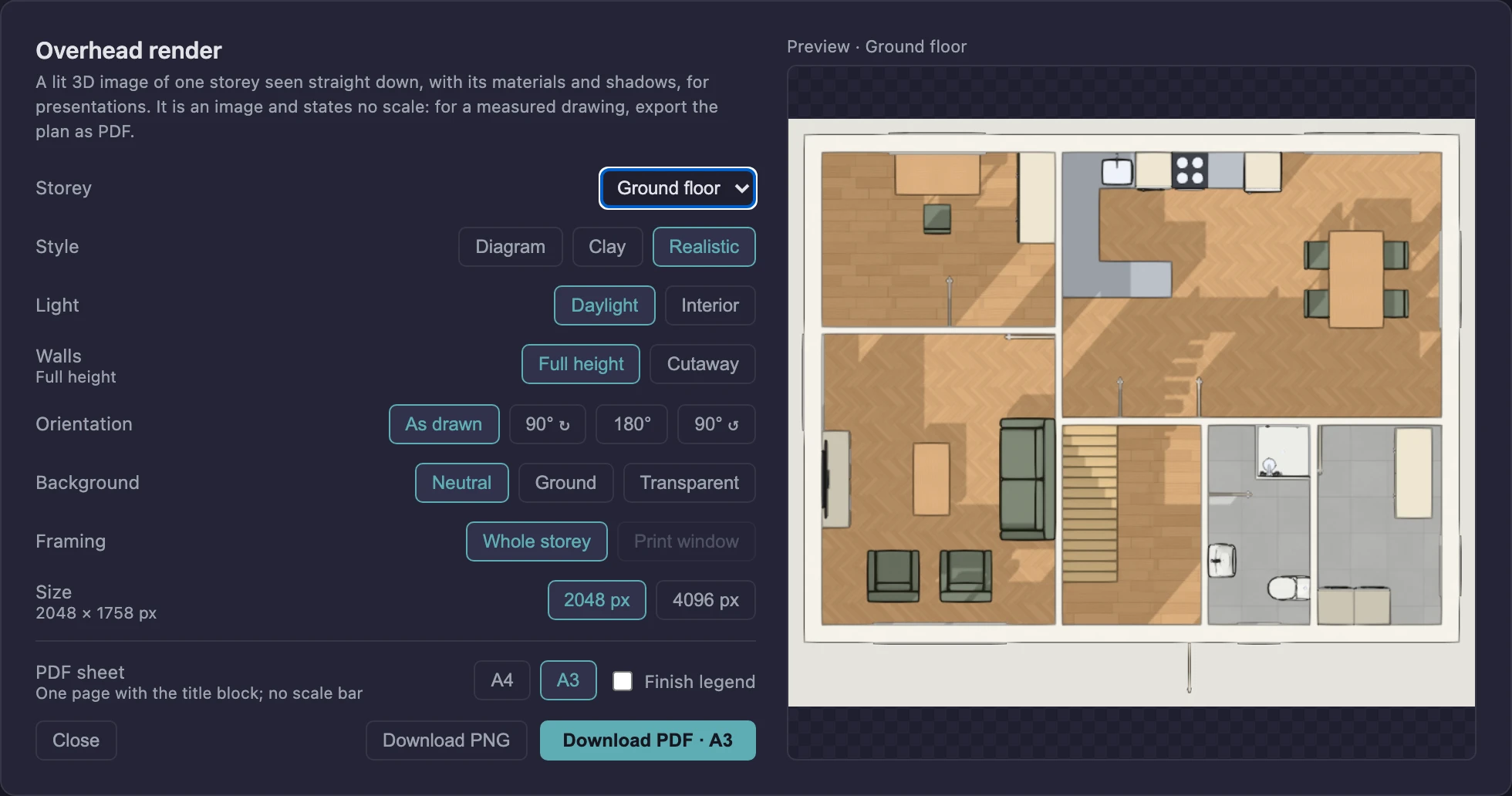
| Renders and 3D | Live 3D (Diagram, Clay, Realistic), saved views and walkthrough; overhead render of a storey as PNG or one-page PDF, a presentation image without scale (free). AI presentation images from a 3D view or from above on Pro: AI-generated, so details may differ from the design. No 360 views, video or 3D-model export | Photorealistic images and videos with sunlight by time and place; 3D files in standard formats (not on mobile) |
Sweet Home 3D details checked on 2026-10-14 against its own pricing and documentation (listed under Sources). Rows we could not confirm are left out rather than marked “no”. Gridsnap prices are the current list prices; corrections welcome via the editor's feedback form.
How this job works in Gridsnap
- Layout: draw the rooms to typed lengths in the browser, or trace an existing plan.
- Furnish: place catalog items and set them to the sizes you need.
- Finishes: choose floors, wall faces and furniture parts and review them in Realistic 3D.
- Deliver: Technical or Textured PDF at scale, finish schedule, DWG/DXF, overhead render or a share link.
Where Sweet Home 3D is strong
- Completely free and open source, with no account and a desktop app that works offline
- Photorealistic images and videos, with sunlight set by time of day and location
- Import your own 3D models and textures to complete the catalog
- Two decades of maintenance and an interface in 29 languages
What to check before you choose Sweet Home 3D
- The mobile app is paid and does not print or create photos and videos
- Rendering and some features need the desktop version rather than the online one
Common questions
Weighing more options? See the free floor plan creators roundup, the full feature list, or browse ready-made templates to judge the output directly.
Is Sweet Home 3D really free? Is Gridsnap?
Sweet Home 3D’s desktop and online versions are free and open source under the GPL; its mobile app is a paid version. Gridsnap’s drawing, furnishing, finishes and exports are free, with Gridsnap Pro ($19/month, $149/year, or $39 once for 90 days) for generated layouts, room kits, finish schemes, design options and automatic dimensions.
Which is better for furnishing and decorating?
Both handle it. Sweet Home 3D has a larger included library, imports your own models and textures, and renders photos and videos. Gridsnap applies finishes to single wall faces and furniture parts, prints them on a Textured plan with a finish legend and schedule, and keeps every size exact.
Which produces better drawings for a builder?
Gridsnap: scaled vector PDF sheets with a title block, generated elevations and sections, and a DWG/DXF. Sweet Home 3D prints and exports plans as PDF and images and is centred on the furnished design and its renders.
Do I need to install anything?
Sweet Home 3D is mainly a desktop application, with a free online version. Gridsnap runs only in the browser; drawing needs no account, and a plan can be shared by link.
Sources and dates
Sweet Home 3D facts were checked on 2026-10-14 against these official pages. Prices and plans change; check the vendor's page before you buy. Gridsnap details on this page were updated on 2026-10-15.
Gridsnap facts come from the current release and its help articles; prices from the pricing page.
Try it on your own plan
Gridsnap runs in the browser and drawing needs no account. Draw a room to real dimensions, furnish it and try a finish, then export the PDF.