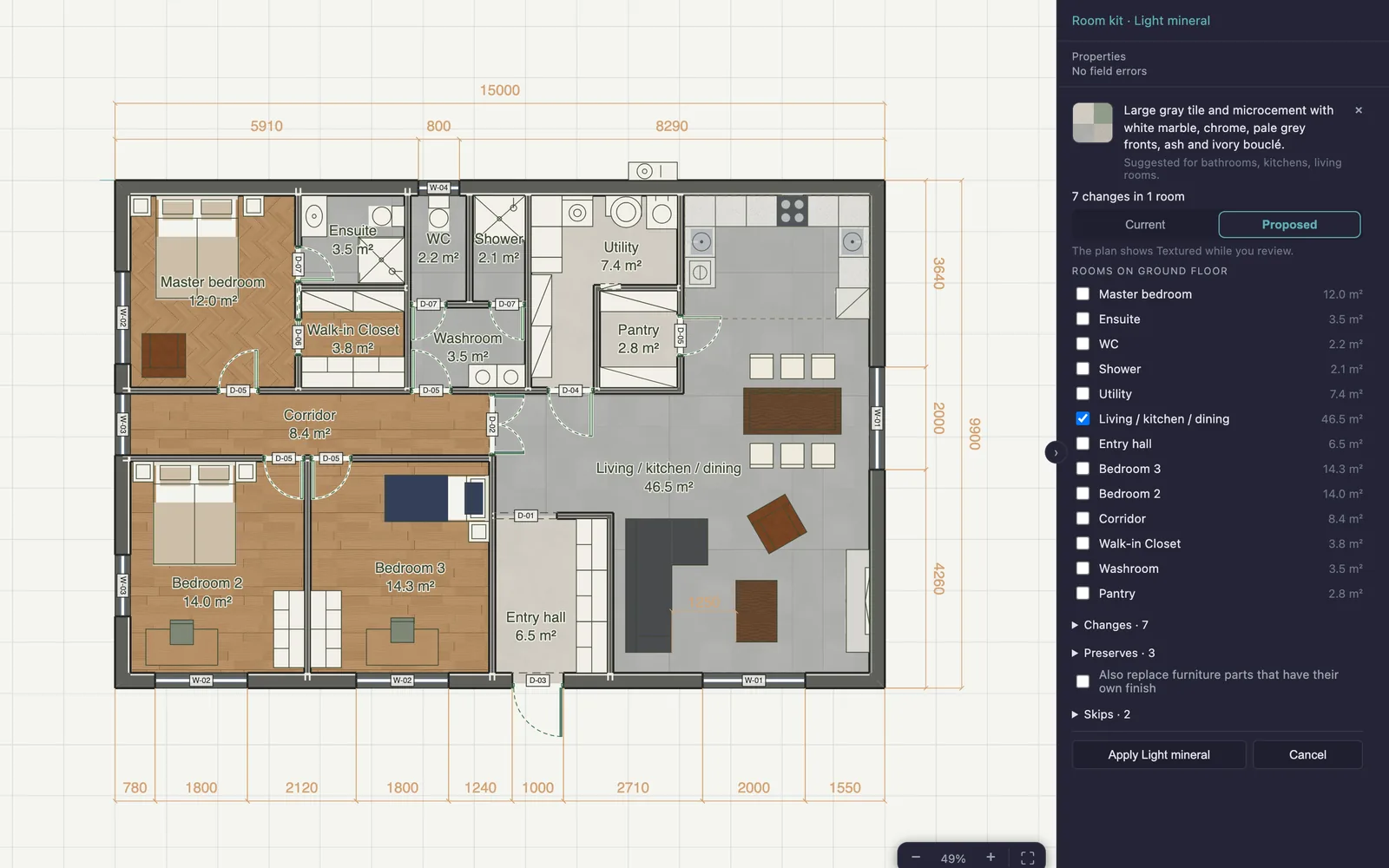
Pro · Room kits
Coordinate several rooms at once
Preview a matching set of floor, wall, joinery and furniture finishes on the rooms you choose, see exactly what changes, and apply it in one step you can undo.
Create and share your design with the free editor. Pro adds tools to generate layouts, apply coordinated room finishes, compare alternatives and keep more projects synced.
| Job | Free | Pro adds |
|---|---|---|
| Develop the design | Draw floor plans to exact sizes, plan rooms by hand, place furniture and choose finishes one surface at a time | Generated layouts and AI help reading a brief (usage limits apply), AI room furnishing, Massing authoring |
| Coordinate and compare | Choose materials room by room; browse the room kits and their materials | Preview, apply and save room kits; save, preview, apply and compare finish schemes; design options compared side by side |
| Review and communicate | 3D, elevations and sections; manual dimensions; the mechanical plan checks; PDF, PNG, DWG and DXF, Technical or Textured; overhead renders; finish legend and schedule; share links | AI presentation images from a 3D or overhead view, automatic dimensions, additional plan checks with explanations and fixes, material quantities, an indicative heat-loss estimate |
| Keep your work | Unlimited local projects; one synced project with a free account | Unlimited synced projects and full cloud version history |
Draw, explore and export.
Plans stay local and private by default. Data is uploaded only if you explicitly enable account sync or create a share link.
Pro for the project you are working on now.
Secure checkout by Stripe. One payment — there is no renewal and nothing to cancel.
Pro for ongoing work.
Secure checkout by Stripe. Cancel to stop the next renewal — access continues until your paid period ends.
When paid access ends, drawing and exports remain free. One project stays synced to your account. Other cloud projects remain available to open and edit as local copies. Paid tools and full cloud version history require Pro again.
Preview a matching set of floor, wall, joinery and furniture finishes on the rooms you choose, see exactly what changes, and apply it in one step you can undo.
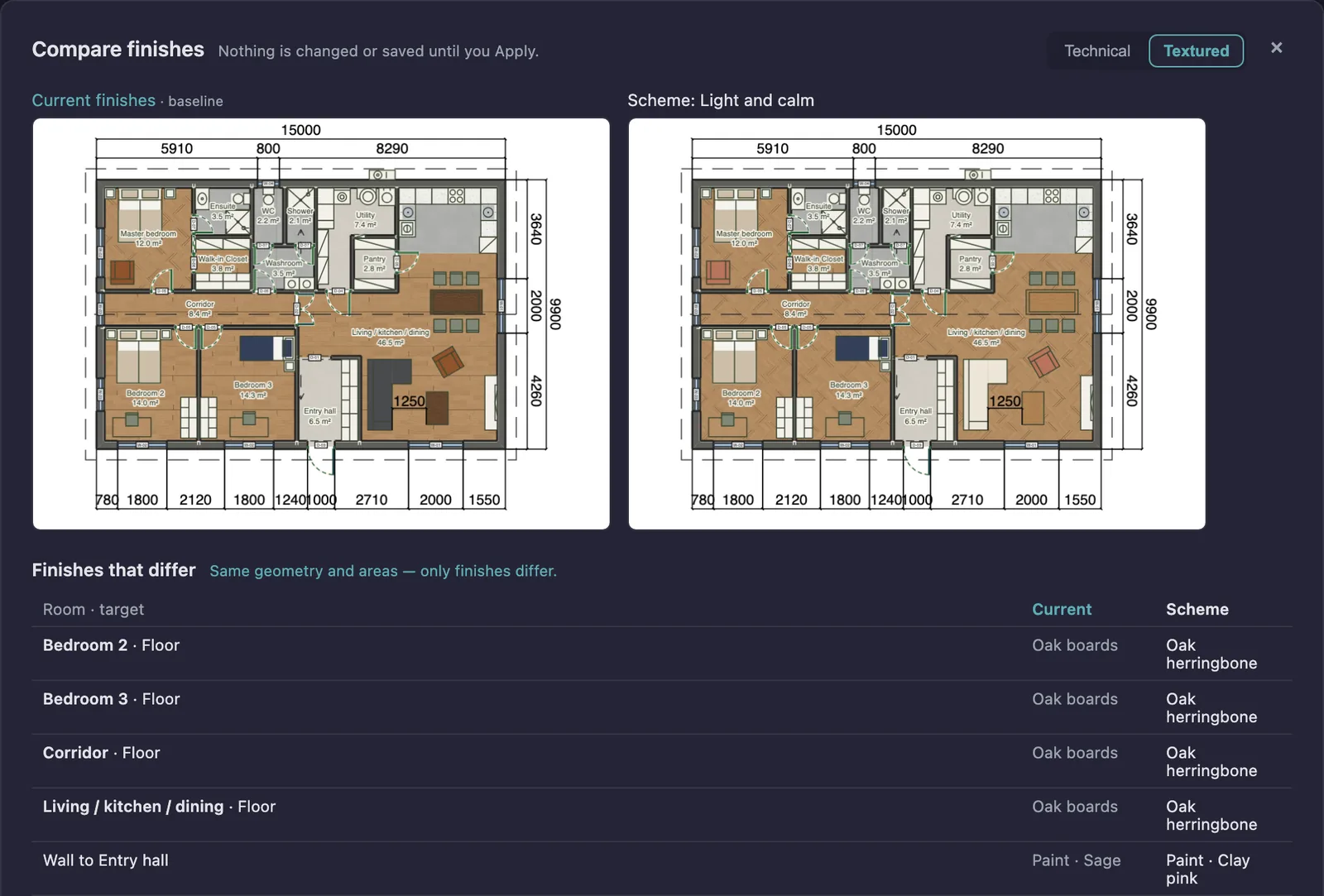
Save the finishes as a named scheme, or the whole design as an option, and compare plans, 3D and the numbers before you decide.
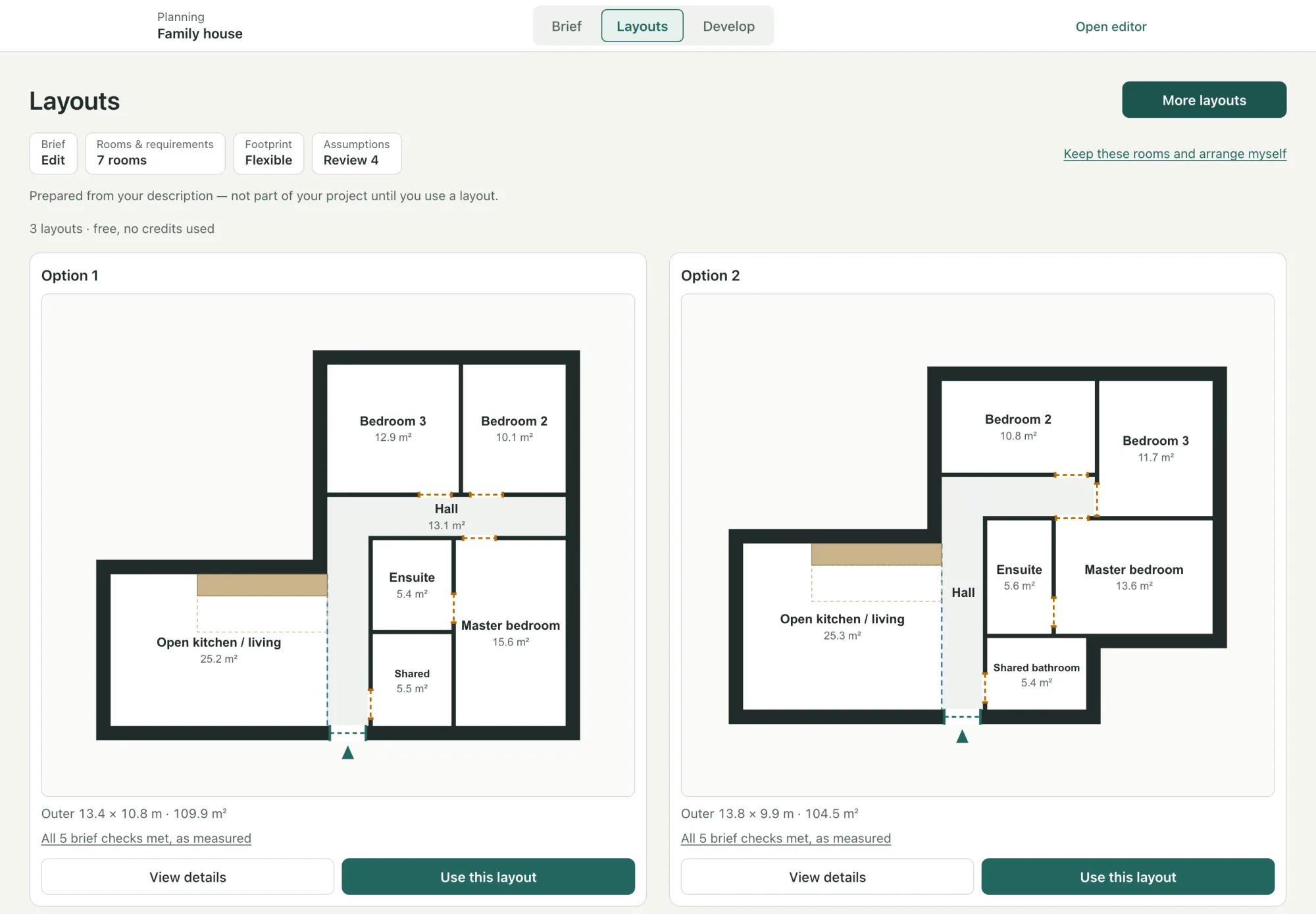
List the rooms, or describe the home in your own words, and compare layouts that are arranged and checked for you. The one you choose becomes ordinary editable walls.
Turn a description into a brief and a room list with sizes, then generate checked layouts to compare. You review each one before it is applied.
Shape buildings in Massing, then create drawing elements. Create design options and compare them side by side, and save finish schemes to compare finish alternatives.
Add automatic dimensions, apply coordinated room finish kits and calculate material quantities from your drawing.
Sync unlimited projects and access full cloud version history.
The same Pro features with every payment option. Unlimited projects included.
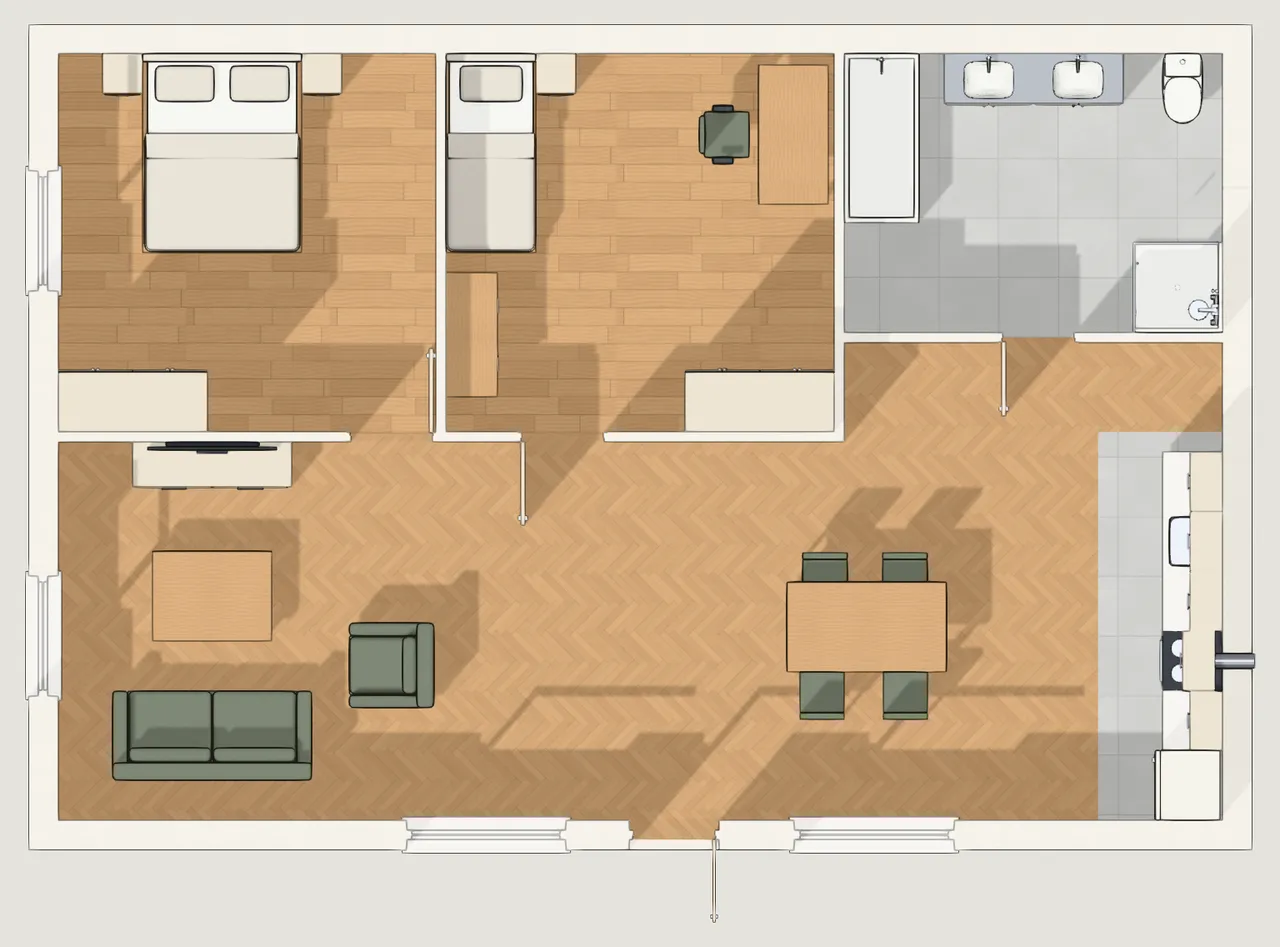
Choose a 3D view, a saved view or a storey seen from above, then how closely the image should follow your design and the mood of the light. Your plan stays unchanged: the image is a separate picture, and you can compare it with the view it came from. What people use them for → · How AI images work →
| Plan | AI images |
|---|---|
| Free | None. The overhead render stays free. |
| Pro Monthly | 50 a month. Unused images do not roll over. |
| Pro Annual | 50 a month. Unused images do not roll over. |
| 90-day Pro access | 150 in total, used whenever you like within the 90 days. |
| Extra images | 50 more for $9 once, with Pro. They never expire and are used after your monthly images. |
Every image you generate counts, including ones you decide not to keep. An image that fails is not counted. If you leave Pro, you can still view, compare and download the images you made.
The same set with every payment option. The payment paths differ only in how long you keep it and how it renews.
Generate layouts from your rooms, each checked before you see it, and compare them side by side. Turn your description into a clearer brief and a suggested room list with sizes. You review every suggestion, and nothing changes until you use it. Existing AI usage limits apply to reading a description; generating layouts uses no credits.
Space planning itself stays free: writing the brief, listing rooms, connecting them, drawing the spaces yourself and building the walls.
Create design options within a project and compare them side by side: plans at one scale, plain or textured, an A/B switch in 3D from the same camera, a room-by-room list of finish differences, and the numbers.
Generate dimensions for plan and elevation views, then review and adjust the result.
Calculate quantities from the elements modeled in your drawing. Quantities do not include material prices.
Save and sync more than one project with your account.
Browse saved cloud revisions and restore an earlier version of your project.
Review additional checks based on your drawing. These checks do not establish code compliance.
View an indicative fabric heat-loss estimate using your model and its assumptions.
Ask for suggestions about your plan and review proposed changes before applying them. Existing AI usage limits apply.
Draw building forms with exact dimensions, give storeys and wings their own heights, repeat storey sequences, lay windows and fins on façades, and create walls, floors and frames from them that stay linked while you keep shaping.
Opening and viewing Massing, Finish in Drawing (which creates the drawing from your massing and hands it over), keeping its saved reference and every Drawing edit stay free.
Preview a coordinated set of floor, wall, joinery and furniture finishes on the rooms you choose, see exactly what changes and what stays, and apply it in one step you can undo. Save the finishes of a room as your own kit and reuse it in other rooms and projects.
Browsing the kits and their materials, and finishing rooms one material at a time, stay free. Kits you saved, on this device or in your account, can always be viewed, exported and deleted.
Save the finishes of your project, or of chosen rooms, as a named scheme. Preview a scheme on the project with exactly what changes listed, compare it side by side with the current finishes, and apply it in one step you can undo.
Finishing rooms one material at a time stays free. Saved schemes stay in the project, and you can always look at, rename and delete them.
Turn a 3D view, a saved view or a storey seen from above into a realistic presentation image: as designed, lived-in, or in a palette to explore. Your plan stays unchanged, and every image is AI-generated, so details may differ from your design. 50 images a month on a subscription, 150 in total with 90-day Pro access.
Drawing, 3D views, saved views and the overhead render stay free.
Free users still see how many additional plan-check findings a plan has, and in what category — the count is never hidden, only the detail and the fixes.
Draw precise floor plans, plan the rooms by hand, place and resize furniture, and choose floor, wall and furniture finishes one surface at a time. Explore 3D, elevations and sections, and export PDF, PNG, DWG and DXF files in the Technical or Textured style, overhead renders and finish schedules. No account is needed to draw or export. You can keep unlimited local projects and sync one cloud project with a free account.
Pro adds generated layouts and AI help with space planning, AI room furnishing, AI presentation images, Massing authoring, room kits to preview, apply and save, finish schemes and design options to compare, automatic dimensions, material quantities, additional plan checks, an indicative heat-loss estimate, unlimited synced projects and full cloud version history. The same Pro features are included with every payment option. Existing usage limits apply to AI tools.
A room kit is a set of materials chosen to go together, which you can apply to any room in any project. A finish scheme is a named record of one project’s own finishes, saved in that project, so you can compare it with the current finishes and put it back. Browsing kits is free; previewing, applying and saving kits, and saving, applying and comparing schemes, are Pro. Saved schemes can always be looked at, renamed and deleted.
Yes. Creating and reshaping building forms, repeating storeys, adding Massing façade rules and creating drawing elements from them require Pro. Opening and viewing Massing, using Finish in Drawing, keeping the saved reference and releasing generated elements stay free. Ordinary Drawing edits, 3D viewing and exports also stay free.
No. It gives your account Pro access for 90 days, including unlimited projects. It is one payment with no automatic renewal.
Pro Monthly renews every month. Pro Annual is charged in full for a year and renews annually. Both include the same Pro features. Cancel to stop the next renewal; access continues until your paid period ends.
Pro Monthly and Pro Annual include 50 AI images a month; unused images do not roll over. 90-day Pro access includes 150 images in total for the 90 days. With Pro you can buy 50 extra images for $9 once; they never expire. Every image you generate counts, including ones you do not keep, and an image that fails is not counted.
They are presentation images, not drawings. Gridsnap asks the AI to keep your furniture, finishes and layout, but the result is AI-generated and details may differ from your design. Your plan is never changed, and you can compare each image with the exact view it was made from.
When paid access ends, drawing and exports remain free. One project stays synced to your account. Other cloud projects remain available to open and edit as local copies. Paid tools and full cloud version history require Pro again.
Material quantities do not include material prices, and finishes are not product specifications. Plan checks and AI suggestions help you review a drawing; they do not establish code compliance. Heat-loss results are indicative fabric heat-loss estimates.
No download, no account, no watermark. Your plan is measurable, printable and shareable from the first click.