Select the building, open Repeat in the inspector, choose the first and last storey of the sequence with From and To, and click Repeat these storeys…. In the panel, set the Count, the picked storeys included (or a height to fill), check the floor-to-floor height from the last storey to the next cycle, and click Create repeat. Repeats are part of Gridsnap Pro.
A repeat is for buildings whose storeys come in a pattern — A, B, A, B — such as a stack of flats whose floors alternate between two layouts, or a tall building whose balcony storeys alternate with plain ones. You shape the first cycle once, and the copies follow it.
Pick the sequence
The storeys you repeat must be next to each other in one building and are called the source. They are labelled A, B and so on, bottom to top.
- In the inspector’s Repeat section, set From and To, then click Repeat these storeys….
- Or, in the view, click one storey and Shift-click another of the same building, then Repeat these storeys….
Set up the repeat
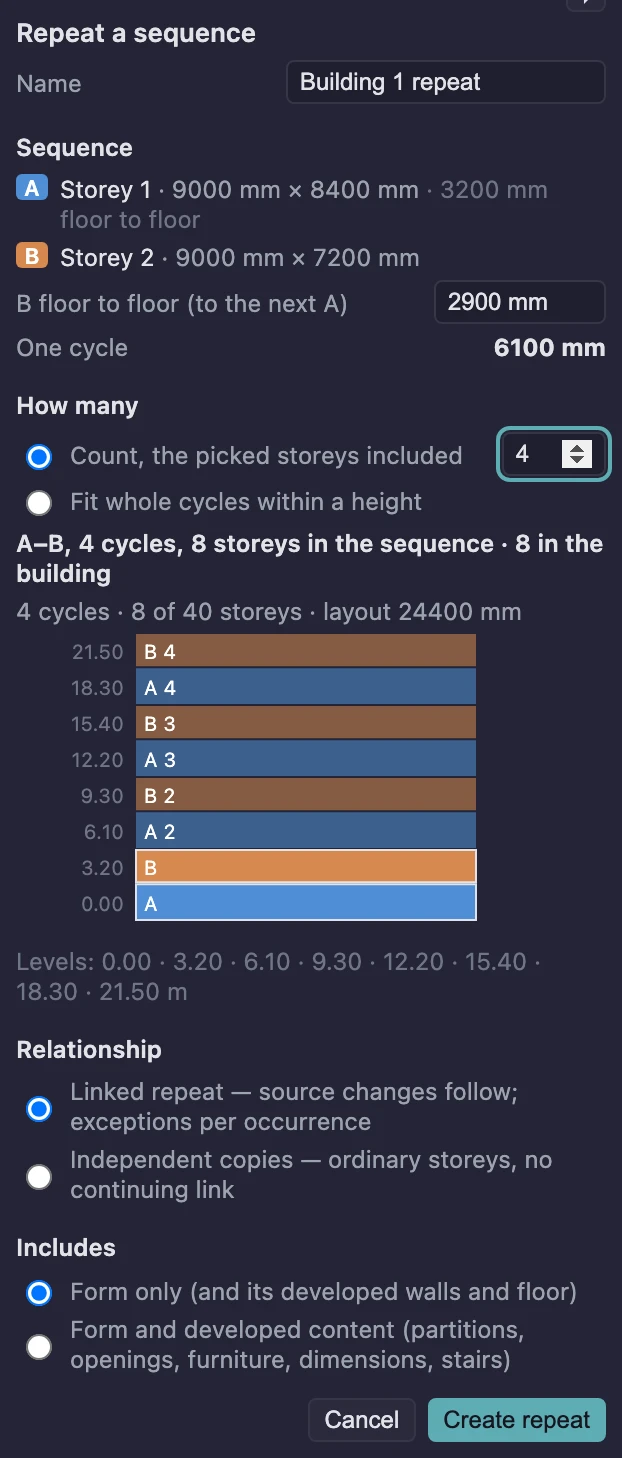
The Repeat a sequence panel previews the result live. Nothing is made until you click Create repeat.
- Sequence lists each source storey with its outline and floor-to-floor height.
- B floor to floor (to the next A) — named after your last storey — is the one height the source cannot tell it: from the floor of the last source storey to the floor of the next cycle’s first. One cycle is the total.
- How many: Count, the picked storeys included (so 4 means the source and three copies), or Fit whole cycles within a height, measured from the first picked storey’s floor. Whole cycles only; a cycle is never stretched or cut.
- The summary line counts it both ways, for example “A–B, 4 cycles, 8 storeys in the sequence · 8 in the building”, and Levels lists every floor level.
- Relationship: Linked repeat keeps the copies following the source, with exceptions per occurrence. Independent copies makes ordinary storeys with no continuing link (the button then reads Make copies).
- Includes: Form only (and its developed walls and floor), or Form and developed content (partitions, openings, furniture, dimensions, stairs) for storeys you have already worked on in Drawing.
In the example above, A is 3200 mm floor to floor and B is 2900 mm, so one cycle is 6100 mm and four cycles put the floors at 0.00, 3.20, 6.10, 9.30, 12.20, 15.40, 18.30 and 21.50 m. Levels are counted from the cycle, never added up storey by storey, so they stay exact.
A building can have at most 40 storeys. A repeat that would land a storey on another building’s storey, or past the limit, is refused with the reason.
Edit the source; the copies follow
Select a copied storey and the inspector says what it is, for example “B · occurrence 2 of 4 · linked”, with three choices:
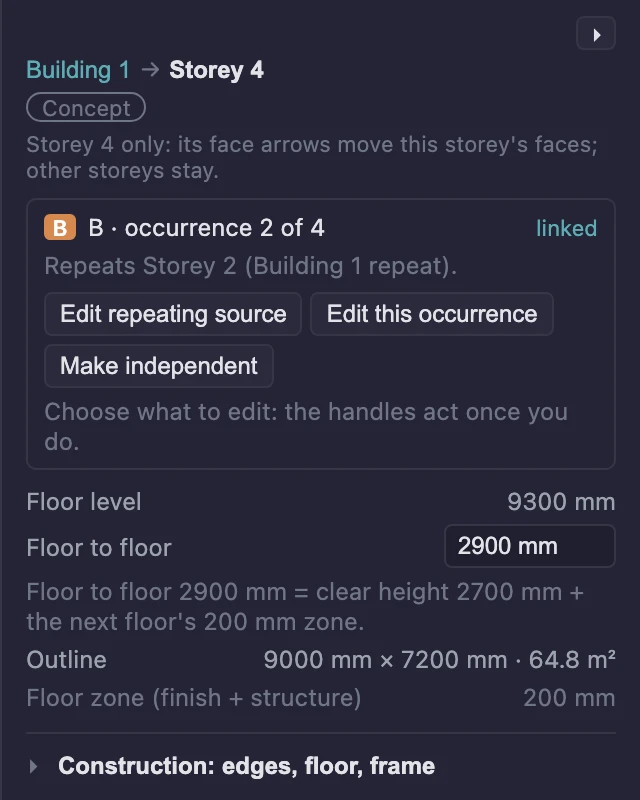
- Edit repeating source selects the source storey. Its changes reach every linked occurrence, which are highlighted while you edit.
- Edit this occurrence edits this copy only. What you change is kept as its exception: its own outline, its own roof and terrace decisions, local edits. Reset to source… puts it back; the review lists what goes.
- Make independent stops this cycle’s storeys following the source. They keep their place in the stack.
A copied storey’s level is set by the repeat. To change a height, change it on the source storey, or change the repeat’s floor to floor.
The repeat itself is listed under Repeat for the building, with its count, its last floor to floor, each occurrence marked linked, customized or independent, and two actions: Detach group turns every copy into an ordinary storey (undo restores the links), and Delete repeat… removes every copy after a review.
Create the drawing
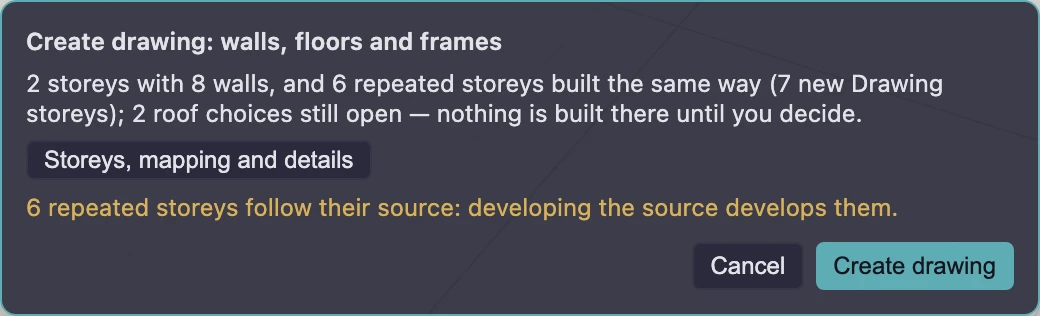
Create drawing… on the building builds the source storeys and every linked copy the same way. The review says so, for example “2 storeys with 8 walls, and 6 repeated storeys built the same way (7 new Drawing storeys)”. Exposed tops on copies follow the source’s roof and terrace decisions; tops you have not decided are listed and not built.
In Drawing, a selected item on a repeated storey says what it is:
- On the source: “edits here reach its 3 occurrences”.
- On a copy: it repeats the source, and “Edits here are kept as this occurrence’s exception; to change every occurrence, edit the source.” with Edit source and Make occurrence independent. Once changed, it reads Changed on this occurrence, with Reset to source.
- Something you add on a copy is “Added on this occurrence only”; the repeat never touches it.
Finish in Drawing keeps every repeated storey as an ordinary storey and ends the links.
What this doesn’t do
- Repeat storeys of different buildings, or storeys that are not next to each other.
- Join a building that has a repeat with another building.
- Stretch or cut a cycle to fit a height exactly; whole cycles only.